



How to Open an Electronic Safe Safely and Fix Common Problems
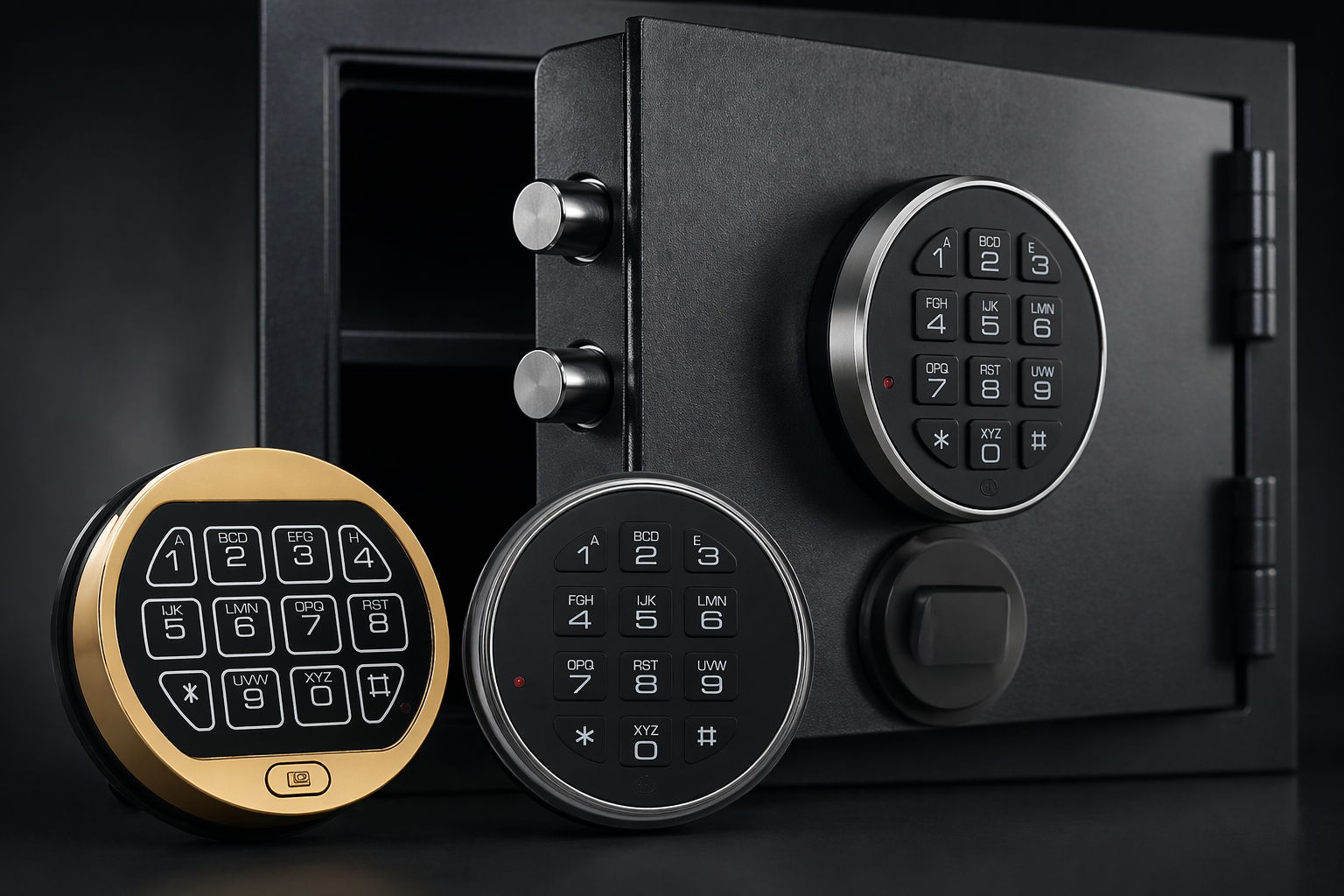
Electronic safes protect cash, documents, and valuables using a keypad lock. They are common in homes, offices, and hotels. Many people choose them for quick access and simple use. Still, problems can happen. A safe may not open when you need it most. This guide explains how to open an electronic safe using safe and proven steps. It covers common issues and how to fix them without damage. The advice applies to most modern digital safes, including models from INKAS® Safes.
What is an electronic safe
An electronic safe is a secure storage box that uses a digital keypad instead of a traditional key. It protects valuables like cash, documents, jewelry, and firearms. You unlock it by entering a preset number code on the keypad. If the code is correct, the internal lock releases and the door opens. Inside the safe, strong steel bolts hold the door tightly closed. These bolts slide in and out when the lock activates. When you enter the right code, the system sends a signal to retract the bolts. This allows you to turn the handle and open the safe. If the code is wrong, the bolts stay locked in place. Most electronic safes include a backup key for emergency access. This key connects directly to the locking system. It works even if the keypad fails or the batteries are dead. The keyhole is often hidden behind a small cover near the keypad. This design keeps the safe secure while still allowing manual access when needed. Electronic safes run on batteries. Most models use AA or 9V batteries placed inside the door or behind the keypad. These batteries power the keypad, control board, and locking mechanism. When the batteries are low, the safe may beep or show a warning light. If the batteries fully die, the keypad will stop working. Many modern safes also include basic security features. These may include a lockout mode after several wrong code attempts. This feature blocks access for a short time to prevent guessing. Some safes also store the code in memory, even when batteries are removed. This means you do not lose your code during battery changes. Electronic safes are popular because they are simple to use and quick to open. They do not require carrying a key at all times. At the same time, they offer strong protection when used and maintained properly. Brands like INKAS® Safes design electronic safes with both security and ease of use in mind.
Common reasons an electronic safe won’t open
Electronic safes are reliable, but small issues can block access. Most problems have simple causes. Understanding them helps you fix the issue without damage.
Dead batteries
Dead batteries are the main cause of failure. When power is low, the keypad may beep weakly or respond slowly. In some cases, nothing happens at all. The display may also fade or stop showing numbers. If the batteries fully drain, the lock will not receive power. This means the bolts stay locked even if you enter the correct code. Many safes give a low battery warning before this happens. Ignoring this warning often leads to lockout at the wrong time. Cold temperatures can also reduce battery power. Safes placed in garages or basements may lose power faster in winter. Always use fresh, high-quality batteries and replace them on a regular schedule.
Wrong code entered
A simple mistake can block access. Pressing keys too fast or at an angle may not register properly. This leads to incorrect input even if you know the code. Many users also forget that codes are case-sensitive in some advanced models. Others may mix up digits if they do not use the safe often. Entering the wrong code several times can trigger a delay. Take your time when entering the code. Press each button once and wait for feedback. This reduces the chance of input errors.
Lockout mode
Most electronic safes include a lockout feature for security. After three to five wrong attempts, the system blocks input for a short time. This delay prevents code guessing. The lockout period depends on the model. Some safes pause for 20 to 30 seconds. Others may lock for five minutes or more. During this time, the keypad will not respond. Some safes beep or flash lights to show the lockout status. Trying to enter codes during this period will not work. Wait until the system resets before trying again.
Jammed locking bolts
Pressure inside the safe can block the bolts. Overfilled safes often cause this issue. Items may press against the door from inside. This creates tension on the locking system. Even if the code is correct, the bolts may not retract fully. The handle may feel stiff or stuck. This is common when documents, bags, or boxes shift inside the safe. To fix this, apply gentle pressure on the door while turning the handle. Try pushing or pulling slightly to relieve tension. Never force the handle, as this can damage internal parts.
Misaligned door or handle
Over time, the safe door may shift slightly. This can happen due to heavy use or improper installation. A misaligned door can affect how the bolts move. If the handle does not turn smoothly, alignment may be the issue. Try adjusting the door position slightly while entering the code. Small movements can help the bolts release.
Worn keypad or buttons
Frequent use can wear out keypad buttons. Some buttons may stop responding or require extra pressure. This leads to incorrect code entry. Dust and dirt can also build up under the keypad. This affects contact between the buttons and the internal circuit. Cleaning the keypad surface can help in some cases.
Internal electronic fault
In rare cases, the control board inside the safe may fail. This can happen due to age, moisture, or power issues. When this occurs, the safe may not respond at all. If you have ruled out batteries and code errors, this may be the cause. At this point, it is best to contact the manufacturer or a professional. Trusted brands like INKAS® Safes can provide guidance based on the model. Understanding these common issues helps you act calmly and safely. Most problems can be solved without force or damage.
How electronic safes work
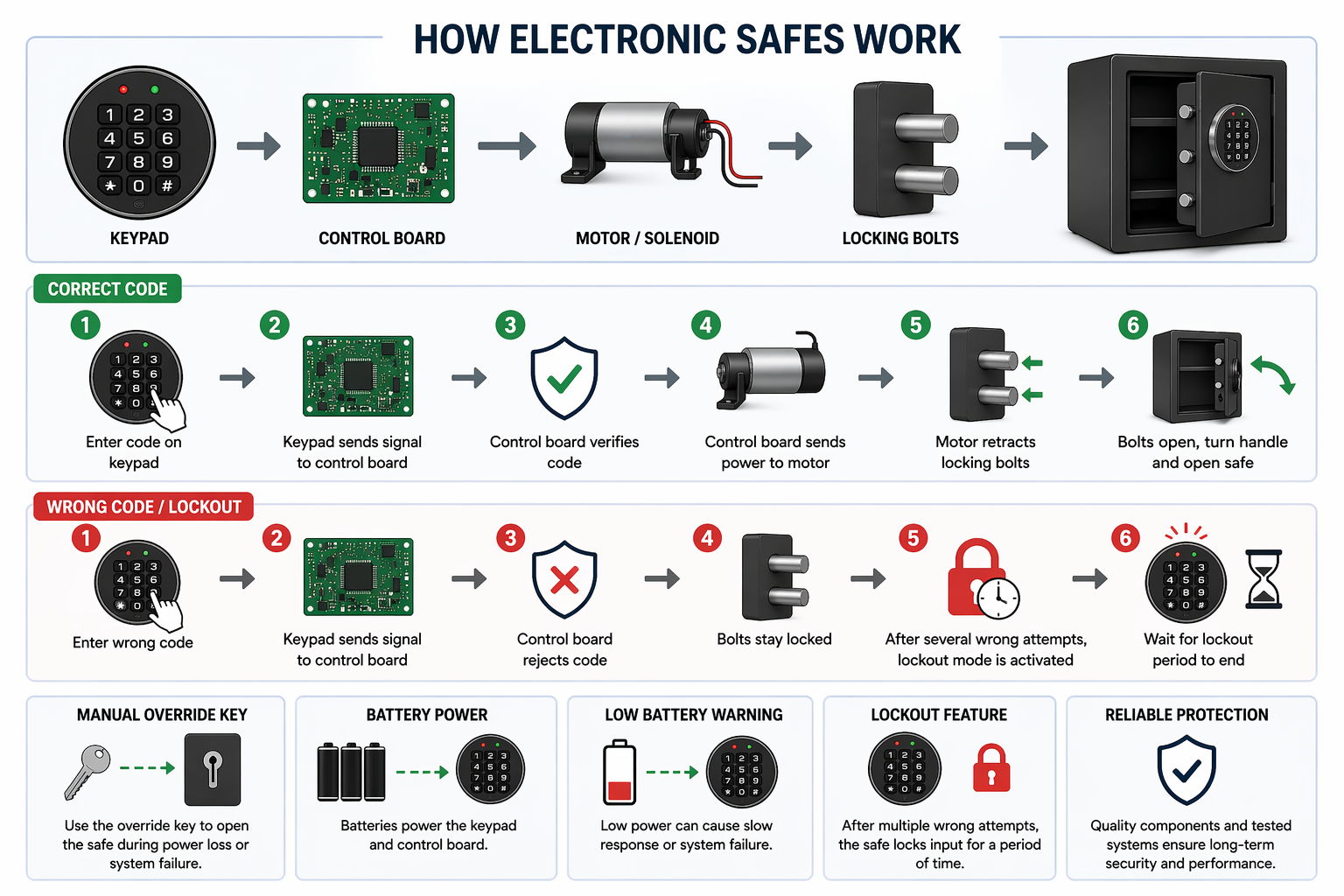
Electronic safes use a simple but secure locking system. An electronic safe is a metal box with a digital lock that opens with a code. It is designed to protect valuables while allowing quick access for the owner. Electronic safes use a basic system with three main parts. These include the keypad, control board, and locking bolts. Each part plays a clear role in opening and closing the safe. The keypad is the part you see and use. It allows you to enter your code. Each button press sends a signal to the control board inside the safe. The keypad may also include lights or sounds to confirm input. The control board acts as the brain of the safe. It stores the correct code in its memory. When you enter a code, the board checks if it matches the stored one. This process takes less than a second in most safes. When you enter a code, the keypad sends a signal to the control board. If the code matches, the board sends power to the locking system. This activates a small motor or solenoid inside the safe. The motor then moves the locking bolts. These are solid steel bars that hold the door shut. When the bolts retract, the door unlocks. You can then turn the handle and open the safe. If the code is wrong, the control board blocks the signal. The bolts stay locked in place. Some safes give a beep or flash a light to show an error. Others stay silent for security reasons. Most safes also include a short time window after correct entry. You must turn the handle within a few seconds. If you wait too long, the bolts lock again automatically. Many electronic safes include extra safety features. One common feature is lockout mode. After several wrong attempts, the system blocks input for a short time. This helps prevent unauthorized access. Most safes also include a manual override key. This key works without battery power. It connects directly to the lock and bypasses the electronic system. You can use it when batteries are dead or the keypad fails. The keyhole is often hidden behind a small panel. This keeps the safe secure while still allowing emergency access. It is important to store this key in a safe place outside the safe. Electronic safes depend on battery power to run the keypad and control board. When batteries are strong, the system works smoothly. When power is low, the lock may respond slowly or stop working. High-quality safes, such as those from INKAS® Safes, are built with reliable components and tested locking systems. This ensures consistent performance and strong protection over time.
How to open an electronic safe when the batteries are dead
Battery failure is common and easy to fix. Most electronic safes depend fully on battery power to unlock. When batteries die, the keypad will not respond. The lock will stay closed even if the code is correct.
Check for an external power option
First, check if the safe has an external battery port. Many models place it near the keypad. It may look like two small metal contacts or a clip point. Some safes also hide this feature behind a small cover. Check your manual if you are not sure where it is located. Not all safes include this option, but many modern models do.
Use a 9V battery for temporary power
Hold a fresh 9V battery to the terminals. This gives temporary power to the keypad. Make sure the battery touches both contacts firmly. While holding the battery in place, enter your code slowly. Wait for the confirmation beep or light. Then turn the handle right away to open the safe. Keep steady contact with the battery during the whole process. If contact breaks, the keypad may lose power again.
Open the safe and replace batteries
If the safe opens, replace the internal batteries right away. Most battery compartments sit inside the door. You will see them once the safe is open. Remove the old batteries and insert new ones in the correct direction. Check the polarity marks to avoid mistakes. Close the compartment securely after replacement.
Use the correct type of batteries
Use good quality alkaline batteries for best performance. Cheap or low-power batteries may fail faster. This increases the risk of future lockouts. Avoid mixing old and new batteries. This can cause uneven power and damage the system over time. Always replace all batteries at once.
What if there is no external port
If your safe does not have an external power option, use the backup key if available. This allows you to open the safe without power. If both options are not available, you may need help from a professional. A locksmith or the manufacturer can guide you based on the safe model. Brands like INKAS® Safes provide support for safe access and maintenance.
Tips to avoid battery issues
Replace batteries every 6 to 12 months, even if they still work. Watch for warning beeps or low battery signals. Test your safe after changing batteries to confirm proper function.
How to open an electronic safe with a backup key
Most electronic safes include an override key. This key works when the keypad fails or batteries are dead. It gives direct access to the lock without using the digital system.
Find the keyhole
Look for the keyhole near the keypad. It is often hidden behind a cover or logo plate. This design keeps the safe secure and clean in appearance. Gently remove the cover using your fingers. Avoid using sharp tools that may scratch the surface. Once removed, you should see the key slot clearly.
Insert and turn the key
Insert the key fully into the keyhole. Make sure it is aligned correctly before turning. Turn the key slowly in the direction shown in the manual. You may feel slight resistance at first. This is normal as the key engages the lock. Do not apply too much force. A smooth turn should release the locking system.
Use the handle if required
At the same time, turn the handle or knob if needed. Some safes require both actions together. Once the lock releases, the bolts will retract. Open the door fully after the handle turns. If the door feels tight, apply light pressure while turning. This can help release tension on the bolts.
If the key does not turn
Do not force the key. If it does not turn, remove it and check alignment. Try again slowly with steady pressure. Dust or dirt inside the keyhole may also cause resistance. In this case, a small amount of lock-safe lubricant can help. Avoid using oil-based products that attract dust.
After opening the safe
Once the safe is open, fix the main issue right away. Replace dead batteries or reset the code if needed. The backup key should not be your main method of access. Store the key in a secure but easy-to-reach place. Never keep it inside the safe. That defeats its purpose and can cause problems later. Reliable safes from INKAS® Safes include well-designed override systems for safe and controlled access.
How to open an electronic safe with a backup key
Most electronic safes include an override key. This key works when the keypad fails or batteries are dead. It gives direct access to the lock without using the digital system.
Find the keyhole
Look for the keyhole near the keypad. It is often hidden behind a cover or logo plate. This design keeps the safe secure and clean in appearance. Gently remove the cover using your fingers. Avoid using sharp tools that may scratch the surface. Once removed, you should see the key slot clearly.
Insert and turn the key
Insert the key fully into the keyhole. Make sure it is aligned correctly before turning. Turn the key slowly in the direction shown in the manual. You may feel slight resistance at first. This is normal as the key engages the lock. Do not apply too much force. A smooth turn should release the locking system.
Use the handle if required
At the same time, turn the handle or knob if needed. Some safes require both actions together. Once the lock releases, the bolts will retract. Open the door fully after the handle turns. If the door feels tight, apply light pressure while turning. This can help release tension on the bolts.
If the key does not turn
Do not force the key. If it does not turn, remove it and check alignment. Try again slowly with steady pressure. Dust or dirt inside the keyhole may also cause resistance. In this case, a small amount of lock-safe lubricant can help. Avoid using oil-based products that attract dust.
After opening the safe
Once the safe is open, fix the main issue right away. Replace dead batteries or reset the code if needed. The backup key should not be your main method of access. Store the key in a secure but easy-to-reach place. Never keep it inside the safe. That defeats its purpose and can cause problems later. Reliable safes from INKAS® Safes include well-designed override systems for safe and controlled access.
What to do if you forgot the code
Forgetting the code is a common problem. It can happen if you do not use the safe often. Stay calm and follow safe steps to regain access.
Check the manual and default code
Start by checking your safe manual. Some safes come with a factory default code. This code may still work if it was never changed. Look for a label inside the manual or packaging. In some cases, the default code is listed on a card. Try entering it slowly and carefully.
Use the backup key
If you have the backup key, use it to open the safe. Follow the correct steps to avoid damage. Insert the key, turn it gently, and use the handle if needed. Once the safe is open, you can reset the code from inside. This is the safest and most direct solution.
Reset the code after opening
Locate the reset button inside the safe. It is often near the hinges or control panel. Press the button and enter a new code. Choose a code that is easy for you to remember but hard for others to guess. Test it several times before closing the safe door.
Contact the manufacturer
If both options fail, contact the safe maker. Provide proof of ownership if required. This may include a receipt or serial number. Brands like INKAS® Safes may guide you through safe recovery steps based on your model. They can explain safe ways to regain access without damage.
Avoid risky methods
Do not try to force the safe open. Avoid drilling or hitting the lock without proper tools. These actions can damage the safe and may void the warranty. Avoid guessing codes repeatedly. This triggers lockout mode and delays access. It also increases stress and may lead to mistakes.
Tips to prevent this issue
Store your code in a secure place if needed. Use a pattern you can remember easily. Open your safe from time to time to keep the code fresh in your memory.
How to reset an electronic safe code
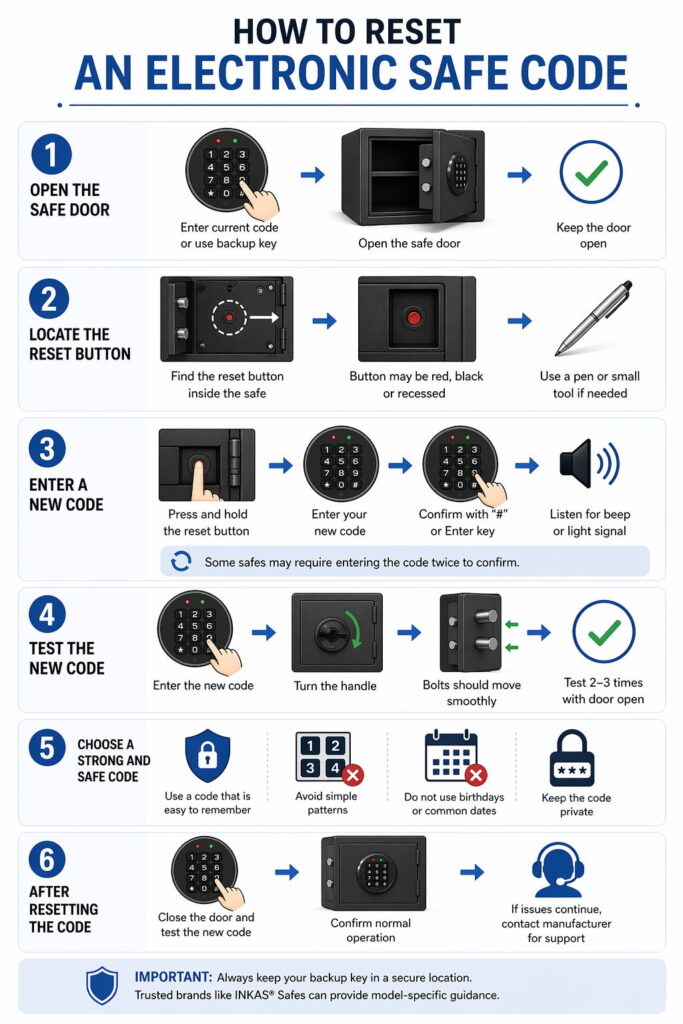
Resetting the code is a simple process on most electronic safes. You must have the safe open to do this safely. Never try to reset the code with the door closed.
Open the safe door first
Open the safe using your current code or backup key. Keep the door open during the full reset process. This prevents lockout if something goes wrong. Place the door in a stable open position. Make sure it will not close by accident. This gives you full access to the control panel inside.
Locate the reset button
Look for a small reset button inside the safe. It is often near the hinges or on the inner side of the door. Some models place it behind the control panel cover. The button may be red, black, or recessed. In some cases, you may need a pen or small tool to press it. Check your manual if you cannot find it.
Enter a new code
Press and hold the reset button. You may hear a beep or see a light signal. This means the safe is ready for a new code. Enter your new code on the keypad. Choose a sequence that is easy to remember but not easy to guess. Then confirm it by pressing a key like “#” or “Enter,” depending on the model. Some safes may require entering the code twice. This confirms accuracy and reduces errors. Listen for a final beep or look for a light signal.
Test the new code
Test the new code several times with the door open. Enter the code and turn the handle each time. Make sure the bolts move smoothly. Repeat this test at least two or three times. This ensures the code is stored correctly. Only close the safe once you are sure it works.
Choose a strong and safe code
Choose a code that is easy for you to remember. Avoid simple patterns like 1111 or 1234. These are easy to guess and reduce security. Do not use birthdays or common dates. Try a mix of numbers that have meaning only to you. Keep the code private and do not share it.
After resetting the code
Close the safe and test the new code again. This confirms normal operation under full lock conditions. If the safe does not respond, repeat the reset steps carefully. If issues continue, contact the manufacturer for support. Trusted brands like INKAS® Safes can provide model-specific guidance.
Troubleshooting common issues
Electronic safes can fail to open for simple reasons. Most issues are easy to fix with basic checks. Work through each problem step by step before calling for help.
Safe beeps but does not open
This often means the code is correct, but the bolts are stuck. The lock has released, but the door cannot move. This usually happens when pressure builds inside the safe. Try turning the handle firmly right after the beep. At the same time, press gently on the door. You can also pull the door slightly while turning the handle. Small movements help release tension on the bolts. Avoid using force. If the handle will not move, stop and try again slowly. Forcing it may damage the lock system.
Keypad does not respond
Dead batteries are the most common cause. When power is low, the keypad may stop working fully. In some cases, it will not light up or make any sound. Replace the batteries with new ones of the same type. Make sure they are installed in the correct direction. If your safe supports it, use an external battery to power the keypad. Check the battery contacts for dust or corrosion. Clean them gently if needed. This helps restore proper connection.
Door feels stuck
Items inside may press against the door. This creates pressure on the locking bolts. Even with the correct code, the door may not open. Apply light pressure in different directions while turning the handle. Try pushing in, then pulling out slightly. These small adjustments can free the bolts. If the safe is overfilled, remove some items once it opens. Keep space between items and the door to avoid future issues.
Lockout delay
Most safes enter a delay after several wrong code attempts. This is a built-in safety feature. During this time, the keypad will not accept input. Wait for the delay to end before trying again. Do not press buttons during this time. This resets the system faster and avoids extending the delay. Watch for signals like blinking lights or beeps. These often show when the safe is ready again.
When basic steps do not work
If none of these steps fix the issue, there may be a deeper problem. The lock or control board may need service. In this case, contact a professional or the manufacturer. Reliable brands like INKAS® Safes can provide support based on the safe model. They can guide you through safe solutions without damage.
When to call a professional locksmith
Some problems need expert help. Call a locksmith if the safe will not open after basic steps. Do not keep trying if nothing changes after several attempts. This can make the problem worse.
Clear signs you need a locksmith
Call a locksmith if the keypad does not respond after battery replacement. This may point to an internal fault. If the backup key does not work, the lock may be damaged. A worn key or blocked keyhole can also cause this issue. Call for help if the handle turns but the door stays locked. This may mean the internal bolts are stuck or broken. Unusual sounds are another warning sign. Grinding or clicking noises may indicate internal damage.
What a locksmith will do
A locksmith will inspect the safe and choose the safest method. They use tools designed for secure entry. Their goal is to open the safe without harming the contents inside. In many cases, they can open the safe using non-destructive methods. This depends on the lock type and condition. In some cases, drilling may be required. This is a controlled process done with care. After opening, the locksmith can repair or replace the lock.
Cost and time expectations
The cost depends on the safe type and the issue. Simple jobs cost less and take less time. Complex locks or high-security safes may take longer. Always ask for a clear estimate before work begins. A skilled locksmith will explain the process in simple terms.
Avoid risky DIY methods
Trying to force the safe can cause more damage. Hitting, prying, or drilling without skill can ruin the lock. It may also damage the contents inside. Many safes include warranty coverage. Damage from forced entry may void this warranty. This leads to higher repair costs later.
Contact the manufacturer if needed
In some cases, the safe maker can guide you first. They may offer steps based on the model and issue. Brands like INKAS® Safes can help you decide the next step.
Final advice
If you are unsure, stop and get help. A locksmith has the right tools and training. This ensures safe access without extra damage.
Tips to prevent future lockouts
Preventing lockouts is simple with regular care and smart habits. Small steps can save time and stress later.
Replace batteries on a schedule
Replace batteries once or twice a year. This avoids sudden power loss when you need access. Many safes give a low battery warning, but it is better not to wait. Set a reminder on your phone or calendar. Use the same time each year to keep it simple. Always replace all batteries at once for stable power.
Use quality batteries
Choose good quality alkaline batteries from trusted brands. Cheap batteries may drain faster or leak over time. This can damage contacts inside the safe. Avoid mixing old and new batteries. Uneven power can affect keypad response and lock function.
Store the backup key safely
Store the backup key in a secure place outside the safe. Choose a location you can access easily in an emergency. Do not hide the key near the safe. This reduces security and defeats the purpose of the backup system. Keep it separate but easy to find.
Choose a strong and clear code
Pick a code you can remember without writing it down in obvious places. Avoid using simple number patterns like 1234 or repeated digits. Do not use dates that others may know, such as birthdays. Choose a number sequence that is personal but not easy to guess.
Test your safe regularly
Open and close your safe every few weeks. This keeps the lock system working smoothly. It also helps you stay familiar with the code. Regular use helps you notice small issues early. You may spot slow response or weak battery signs before they become problems.
Keep the keypad and lock clean
Dust and dirt can affect keypad buttons over time. Wipe the surface with a dry cloth to keep it clean. Avoid using liquids near the keypad. Moisture can damage the internal circuit. Keep the safe in a dry place when possible.
Avoid overloading the safe
Do not fill the safe too tightly. Items pressing against the door can block the locking bolts. This may prevent the door from opening. Leave some space between items and the door. This allows the bolts to move freely.
Follow the manufacturer’s guidance
Each safe model may have small differences in use and care. Check the manual for specific instructions. Trusted brands like INKAS® Safes provide clear guidance for long-term use and maintenance. Following these steps helps keep your safe reliable for years.
Conclusion
Electronic safes offer strong protection and simple use. Most opening issues have clear and safe solutions. Dead batteries and wrong codes are the main causes. These are easy to fix with basic steps. Use the backup key when needed and reset your code if required. Avoid force or risky methods that may damage the safe. If problems continue, contact a trusted provider like INKAS® Safes. With proper care, your electronic safe will stay secure and work well for many years.